
32% off/$9.50
This offer has expired!
Be sure to follow us on Twitter for the latest deals and more. Sign-up for our newsletters and have our best offers delivered to your inbox daily.
Acer 2.4GHz 6-Button Wireless Mouse
Buy for $9.50 (Reg. $14)

What we love
We feature a lot of premium mice around here, but today we thought we’d shine a light on a more affordable solution from Acer that delivers adjustable DPI, six buttons, and 2.4GHz connectivity for only $9.50 Prime shipped. So if you’re after the basics at an affordable price, here you go.

More curated coverage for you
Acer 2.4GHz 6-Button Wireless Mouse features:
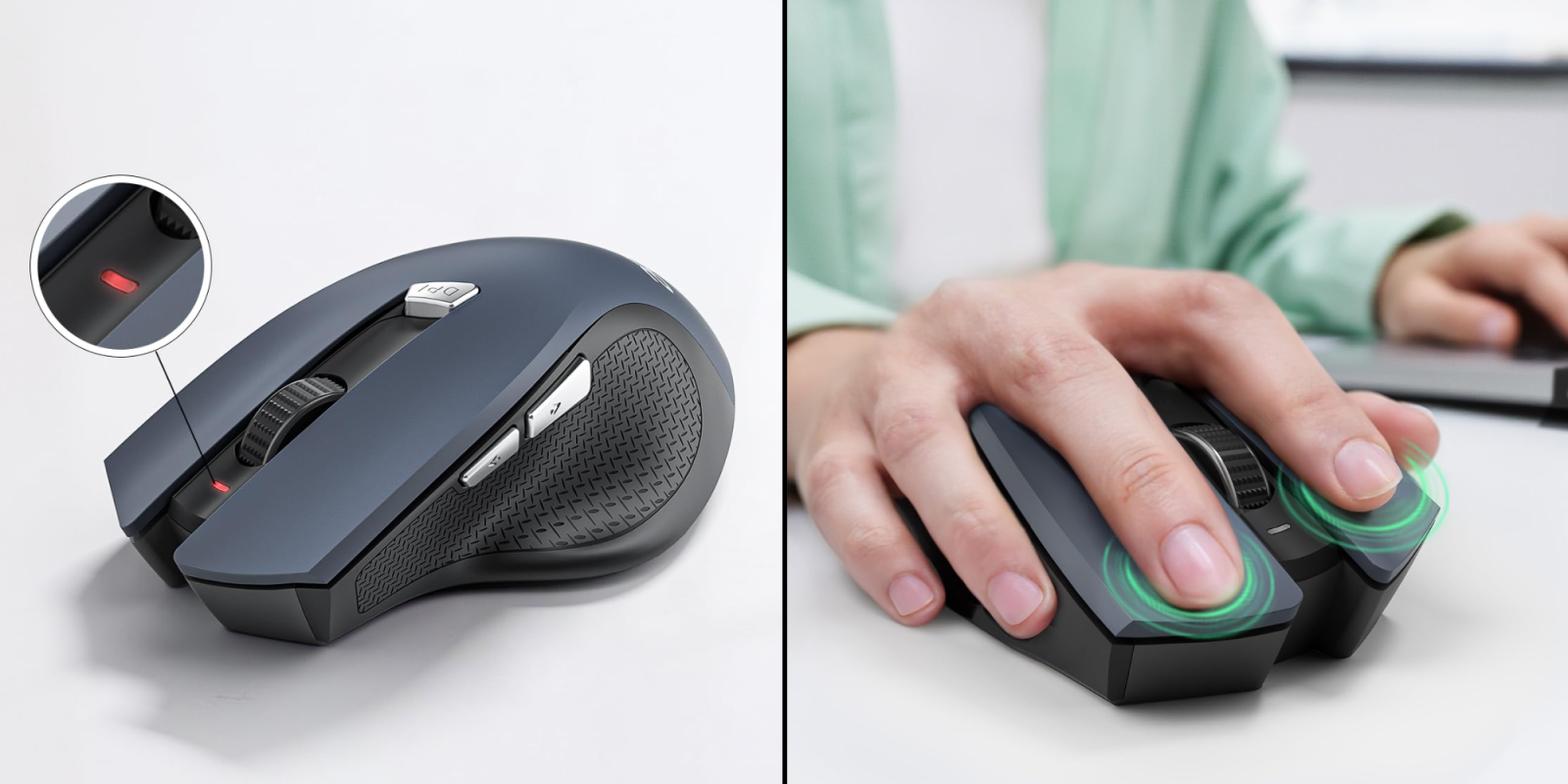
- 【Plug and Play for Home Office】The wireless computer mouse features 2.4GHz connectivity, delivering a stable, interference-free connection up to 32ft. Designed for 𝐦𝐞𝐝𝐢𝐮𝐦 𝐭𝐨 𝐥𝐚𝐫𝐠𝐞 𝐬𝐢𝐳𝐞𝐝 𝐡𝐚𝐧𝐝𝐬, it ensures comfortable use all day. Simply plug in the USB-A receiver for instant pairing—no drivers needed. 📌📌 If the mouse isn’t suitable, place the USB receiver in the battery compartment and return both.
- 【3 Levels Adjustable DPI】This travel USB mouse offers 3 adjustable DPI settings (800, 1200, 1600), allowing you to customize sensitivity for precise design work. Effortlessly switch to match your task and elevate your productivity. 📌 Please remove the film at the bottom of the mouse before use.
- 【Effortless Browsing】Equipped with forward and backward buttons, this computer mice streamlines your workflow, making it easy to navigate through web pages and files with a simple click. 📌Side button does not work on Mac.
- 【Visible Indicator Light】 The pc mouse features a visual indicator for DPI levels and low battery alerts. The red light flashes once for 800 DPI, twice for 1200 DPI, and three times for 1600 DPI. When the battery level is below 10%, the light flashes red until the mouse is completely out of power.
- 【Click to Wake】With smart sleep mode, it saves power by standby after 10 inactive minutes, just 2-3 clicks to wake. This efficient design delivers 3x longer battery life than motion-wake mice. Engineered for durability, its buttons and scroll wheel are tested for 10 million clicks, ensuring long-term reliability and consistent performance.
- NOTE: The AAA batteries are not included. The USB-A receiver is conveniently stored in the battery compartment at the back of the mouse. Make sure the battery cover is fully embedded in the slot to prevent loosening.
Get deals sent directly to your inbox every day with our 9to5Toys newsletter


FTC: We use income earning auto affiliate links. More.
You’re reading 9to5Toys — experts digging up all the latest technology and lifestyle deals, day after day. Be sure to check out our homepage for all the latest news, and follow 9to5Toys on Twitter, Facebook, and LinkedIn to stay in the loop. Don’t know where to start? Check out the best Apple deals, our daily podcast, and subscribe to our YouTube channel




Comments