

Two years after introducing its first Kindle with a color display, Amazon is updating its flagship e-reader with the new Kindle Colorsoft Signature Edition. With a redesigned display and a return to the aluminum body of the Kindle Oasis, Amazon is addressing some of the biggest shortcomings of the original model. But are these changes enough to make the higher price worthwhile?
Learning from the Oasis
I’ve owned several Kindles over the years, and my favorite has been the 2019 Kindle Oasis. I especially liked its aluminum body. I’m careful with my devices, but it’s nice knowing a metal frame can take a little more abuse when I toss my Kindle into my backpack while traveling. I also appreciated the built-in 4G LTE connectivity, which let me download books anywhere without having to connect to Wi-Fi. I once found that particularly handy on a trip when I burned through my entire reading list halfway through the vacation and wanted to download some new titles to get me through the rest of it.
In 2024, I replaced my Oasis with the first-generation Colorsoft Signature Edition. The Oasis still used micro-USB, and I’d fully embraced USB-C by that point. I was also curious to see what a color display could bring to the e-reader experience. But making the switch meant giving up 4G LTE connectivity and an aluminum body. Some might consider the latter a minor complaint, but the Colorsoft Signature Edition was marketed as a premium device, and its plastic construction never quite lived up to that promise for me. The color display was a welcome upgrade, but the device itself always felt cheap. Thankfully, Amazon has corrected course with the 2026 Kindle Colorsoft Signature Edition.

Features at a glance:
- 7-inch color E Ink display
- Aluminum body, available in Graphite or Fig
- 32GB of storage
- Auto-adjusting front light
- Waterproof design (IPX8)
- Up to eight weeks of battery life, according to Amazon
- Dual-band Wi-Fi (2.4GHz and 5GHz)
- No ads
While it still lacks cellular connectivity, the new Kindle once again looks and feels like a premium product. Fig is exclusive to the Signature Edition (perfect for color coordinating with your new burgundy iPhone 18 Pro). The power button has also (thankfully!) moved from the bottom of the device to the top-right corner. Why it was ever placed on the bottom in the first place remains a mystery to me. I’ve accidentally pressed it while reading with my Kindle resting in my lap or against my chest, so moving it to the top makes much more sense. The Colorsoft Signature Edition is waterproof, too, making it a good companion for the beach, poolside, or a relaxing bath.
That premium construction comes at a price, though. The new Signature Edition costs $40 more than the 2024 model it replaces and $30 more than the new standard Colorsoft. The cheaper model saves you a little money but sacrifices the auto-adjusting front light (more on that below), half the storage (16GB instead of 32GB), the aluminum body, and the Fig color option.
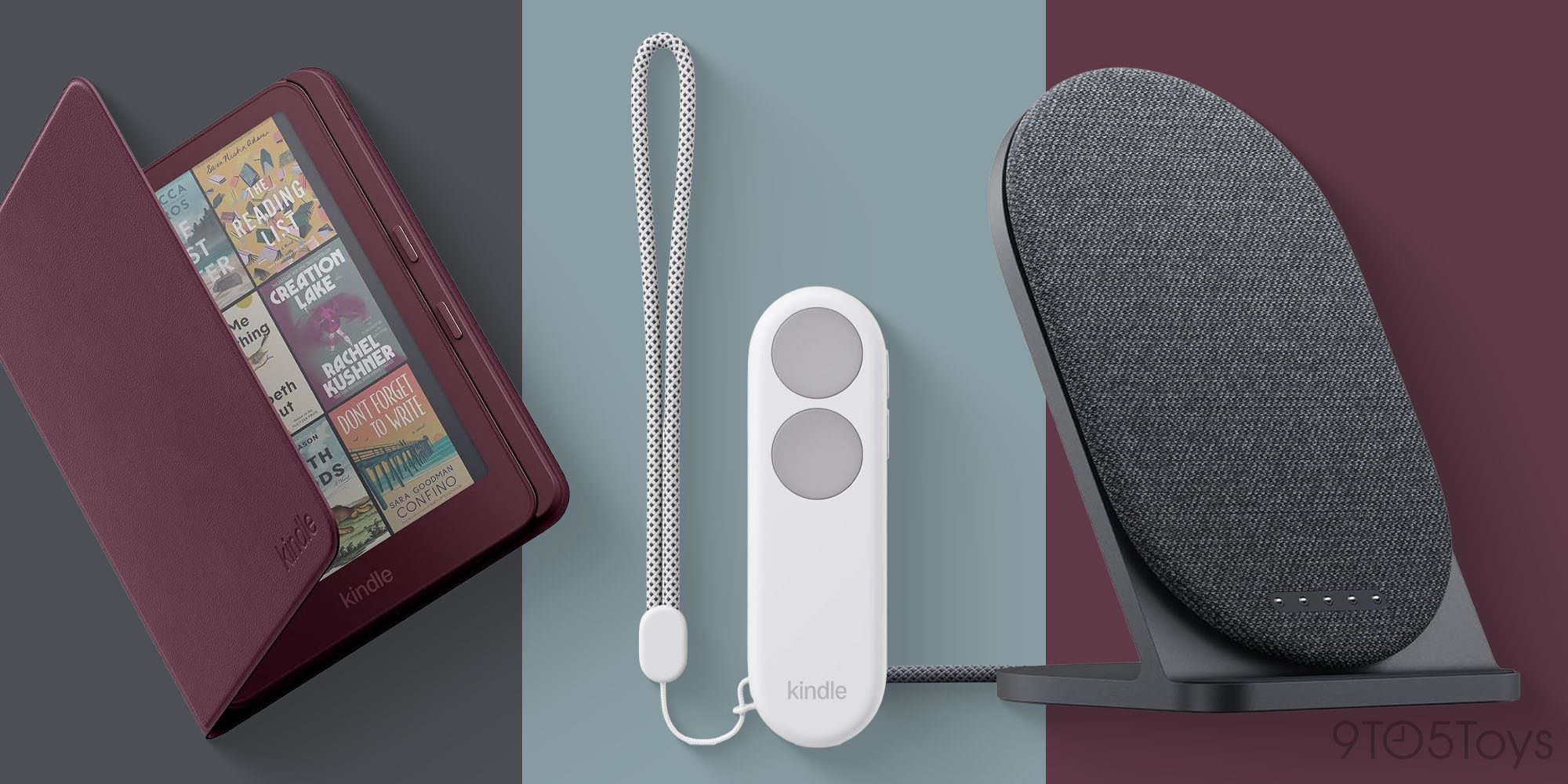
That $40 premium also gets you compatibility with a couple of new accessories, including an upright Charging Dock that connects via pogo pins and a Page Turn Cover with physical buttons. The cover is a welcome addition for anyone who misses the physical page-turn buttons on the Kindle Oasis. It doesn’t need its own battery or require any pairing with the Kindle, either. Now, if only Amazon could bring back cellular connectivity with built-in 5G, it might finally have the perfect Oasis successor on its hands.
Amazon has another new accessory for readers who prefer not to reach for their Kindle every time they want to turn a page. The Kindle Click is a Bluetooth remote that lets you flip pages from a distance, with dedicated buttons for adjusting brightness and putting the Kindle to sleep. It’s rechargeable over USB-C and could be particularly useful when reading on a treadmill or with your Kindle propped up.
Fixing the Colorsoft’s biggest flaw
So, how is the display? The 2024 Colorsoft Signature Edition produced nice colors, but it was plagued by yellow banding along the bottom edge of the screen. The discoloration gave the display a yellowish tint, almost as if the bottom had been highlighted or stained. I know this firsthand: my original 2024 Colorsoft had the issue, so I exchanged it for a replacement through Amazon. The replacement was visibly better, but I wouldn’t quite call it flawless.
For the 2026 model, Amazon says it has redesigned the display to address some of these issues.
Our latest Kindle Colorsoft has a completely redesigned display, using the reverse printing technology we applied across the lineup for edge-to-edge color. The light guide contains micro-deflectors that minimize stray light and improve uniformity, and an ultra-thin optical coating in the display stack improves clarity.

I’m happy to report that I don’t see any yellow tinting on the new Colorsoft display. It’s still an e-ink display, though, so don’t expect the clarity or vibrancy of an OLED screen on an iPhone. Instead, text and images have a printed-on-paper quality, much like a newspaper. The upside is that you can read outside, even in bright sunlight, without dealing with glare.
The display offers two color settings: Standard and Vivid, with the latter making colors pop a bit more. I prefer Vivid for its boost in saturation. Aside from the lack of yellow banding, I didn’t notice any meaningful differences in color reproduction or overall display quality compared to the 2024 model.

The Colorsoft Signature Edition features an auto-adjusting front light that adapts screen brightness to your surroundings, a feature missing from the standard Colorsoft. I typically adjust my Kindle’s brightness manually, but those who prefer to let their e-reader handle it will appreciate having the option. It’s a useful convenience, but not one I’d consider a must-have.
If I had one niggle with the display, it’s that at this price point, I’d like to see a glass screen with an anti-glare finish instead of plastic. It would make an already premium-feeling device seem even more high-end.
Life with the Colorsoft
If you’re familiar with the Kindle reading experience, you won’t find anything particularly new here. That’s not a bad thing. The interface is familiar, and everything works as you’d expect.
The reading experience itself remains solid. Page turns are fast, and the Kindle’s interface feels quick and responsive. For books, you can customize the typography to suit your preferences, including the font, text size, line spacing, and margins. Text remains crisp, clean, and easy to read, just as it should be.
Comics are a different story (pun intended). Most, if not all, use fixed layouts, so you can’t adjust the text or page formatting as you would with a regular book. Some comics are also better optimized for Kindle displays than others. I downloaded a sample of the Dungeon Crawler Carl graphic novel and found it a bit difficult to read on the Kindle’s 7-inch screen because I had to zoom in manually to read each panel.

Other comics, like Star Wars: Darth Vader, are better optimized for Kindle and take advantage of Kindle Panel View or Guided View. This feature starts by showing you the full page before breaking it up into individual panels, making smaller text much easier to read. I wish there were an easy way to tell which comics support this feature before buying, but downloading a sample seems to be the only way to check. It’s a shame Dungeon Crawler Carl doesn’t offer Guided View. Mongo is appalled!
You can purchase books directly from Amazon’s Kindle Store or load your own DRM-free books, PDFs, and other documents. I’ve amassed a fair collection of books from Amazon and other sources over the years, and I find the easiest way to get outside purchases onto my Kindle is through Amazon’s Send to Kindle service in a browser. Just drag and drop compatible files, upload them to the cloud, and download them to your Kindle. It works like magic.
Amazon claims up to eight weeks of battery life on a single charge, but that estimate assumes just 30 minutes of reading per day, with wireless turned off and the brightness set to 13. I typically read for about an hour each night before bed, and while I haven’t had the new Colorsoft Signature Edition for eight weeks, I’ve only needed to charge it once since unboxing it. I also keep my Kindle in airplane mode unless I’m downloading a new book, which helps conserve battery life. Based on my experience so far, battery life seems to be in line with Amazon’s claims.
The Kindle also supports Audible audiobooks over Bluetooth, but I wouldn’t recommend it as your primary way to listen to Audible, and I certainly wouldn’t buy a Kindle for that purpose alone. If you do listen to audiobooks this way, expect battery life to take a significant hit.

Wrap up
The 2026 Kindle Colorsoft Signature Edition is a welcome improvement over its predecessor, with a more premium design and a redesigned display that addresses the yellow banding issues that plagued the original. The reading experience remains excellent, and new accessories like the Page Turn Cover make it an even more appealing option. It’s not a dramatic upgrade if you already own the 2024 model, but those who held off on buying the original Colorsoft now have a better option. Just be prepared to pay a little more for it.
If you’re shopping for a new Kindle, the Colorsoft Signature Edition isn’t your only option. Amazon’s 2026 lineup includes six models, with prices starting at $149.99. Here’s a look at the other Kindles available:
- Standard Kindle 16GB – $149.99
- Kindle Aluminum 32GB – $189.99
- Kindle Paperwhite 16GB – $199.99
- Kindle Paperwhite Signature Edition 32GB – $249.99
- Kindle Colorsoft 16GB – $289.99
- Kindle Colorsoft Signature Edition 32GB – $319.99


FTC: We use income earning auto affiliate links. More.



Comments