
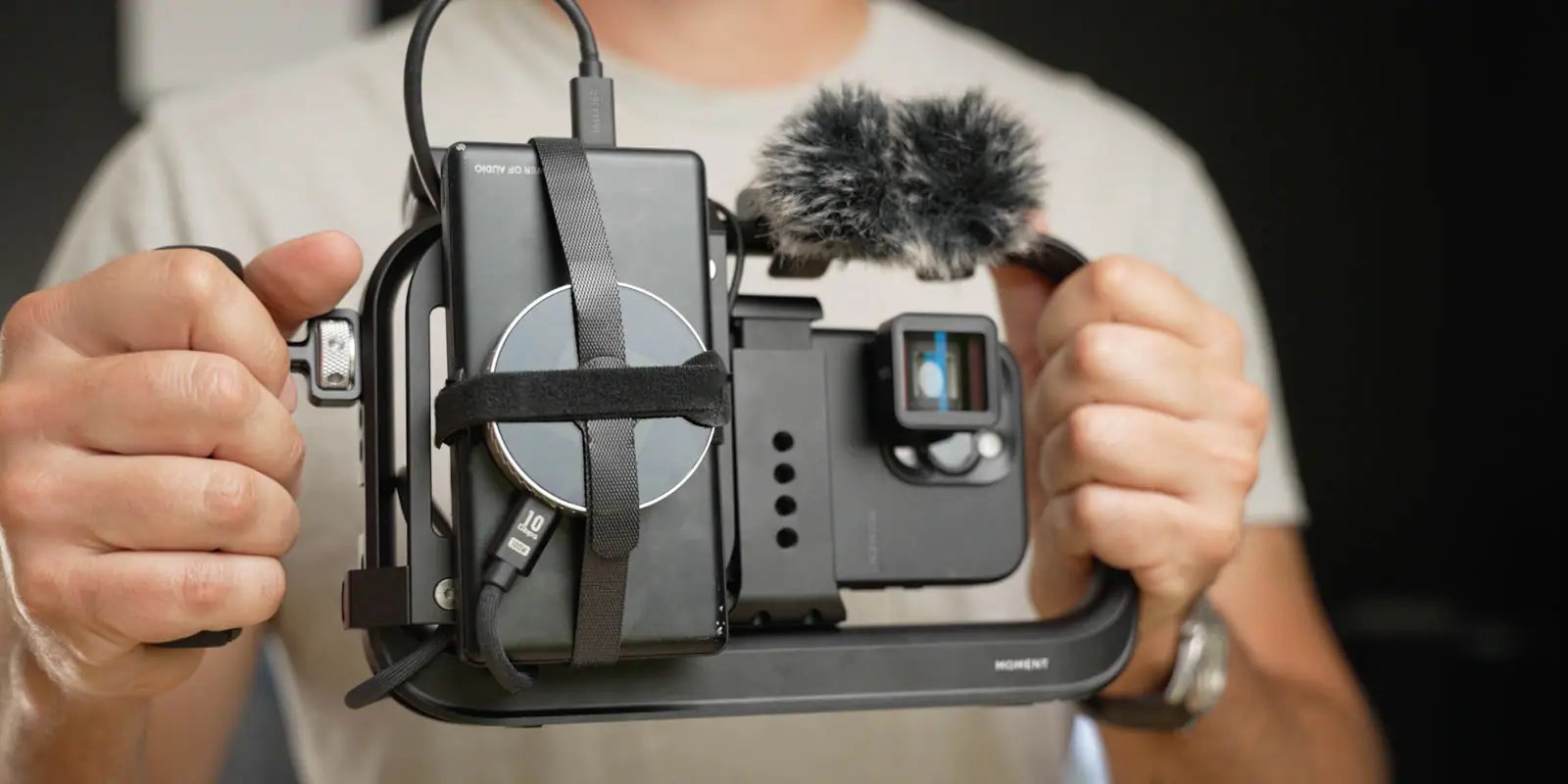
Moment’s new Supercage packs a lot more than meets the eye. At its core, it clamps onto a mobile device to add stability and allow for easy mounting of accessories. Upon closer inspection, there’s a lot more going on with sleek design choices and integrated electronics. Be sure to hit the video below to find out more.
I’ve tried out some iPhone cages in the past, like the SmallRig X Brandon Li Mobile Video Kit (which is on a huge sale right now), but Moment’s Supercage is so much more than just a cage.
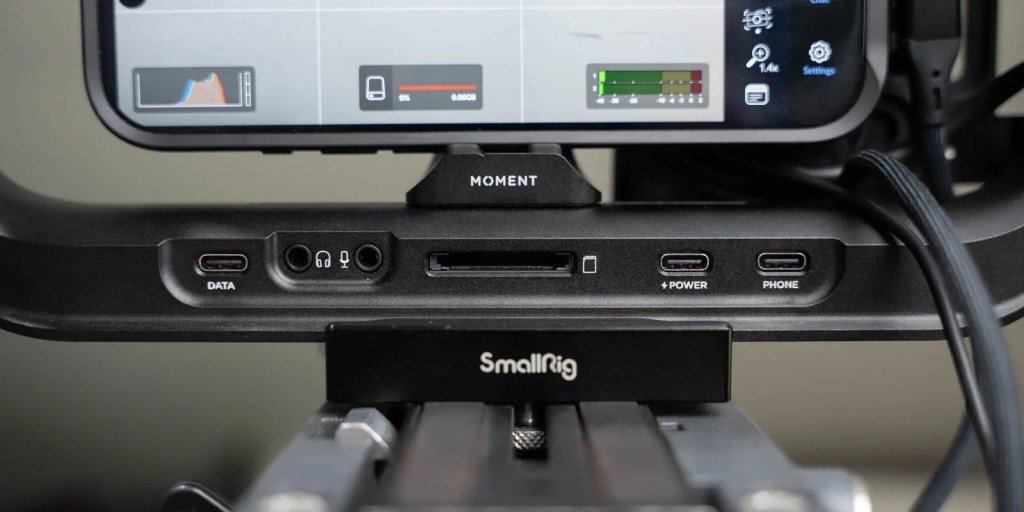
The main thing you’ll notice is that along the bottom is a USB-C hub integrated into the frame of the cage.
Labeled on the hub are a USB-C port for Data, a headphone port, a microphone port, a full-size SD card slot, a USB-C port for power, and another USB-C port for connecting your phone.
Underneath the cage on the sides of the hub are an additional USB-C data port and a full-size HDMI port.
This is just about everything a filmmaker needs to build out a powerful rig that, on my iPhone 16 Pro, can take full advantage of the resolution and ProRes capabilities that make it powerful enough to capture feature films.

Thoughtful design
First off, let’s take a look at the design of the cage. Beyond the integrated hub, one of my favorite features is that the bottom fits perfectly into an Arca-compatible mount. So if you have an Arca base plate, you can just mount the cage anywhere without needing to add another plate to the bottom. I think that’s a huge design feature, mainly because I use Arca on all of my mounts.
The rest of the cage features NATO rails, four cold shoe mounts, 39 ¼”-20 threads, and 4 x ⅜” – 16 threads. Need to mount a light or another accessory? There are plenty of options.
Moment Supercage: Video
Phone Mounting
At the core is an adjustable industrial phone clamp mount. It held my iPhone 16 Pro just fine – I had no issues with it. It can be adjusted left and right to better fit different phone designs.
Accessories
The only downside here is that the Supercage doesn’t come with any handles. Maybe this helps to save money if you already have some, but if you’re starting from scratch, the handles are at least $40/ea.

The Grip
We also tried a couple of accessories for the cage, including a single handle. The handles feel great, are adjustable, and can be equipped with a shutter button for easier phone control
The Cheeseplate
The other accessory we have from Moment is the cheese plate, which adds more mounting points. This $67 was the perfect place to mount a battery bank, my Dockcase SSD enclosure, and hold some of the extra cables to plug in a DJI Mic receiver.

Building out my Moment Supercage rig
Here is the rig all together. I’ve got a DJI mic, battery bank, so I don’t need to worry about draining my phone’s battery, Dockcase SSD drive, and typically have a pair of headphones ready to monitor my audio.
I have a super cheap monitor that I can mount on top as well, but I don’t typically use that. I’d want to pick up something higher quality if I were going to use a monitor.
More Moment
I’m using the Moment Camera Case as well, which lets me easily attach any of their lenses and filters. My favorite is the VND – it’s easy to attach and easy to use. For more info, check out this video over on 9to5Mac.
9to5Toys’ Take
The Moment Supercage is extremely versatile with its USB-C hub, ARCA mounting, and massive variety of mounting points, but we haven’t covered the cost yet. The Supercage starts at $200. As I have it configured, with the handle and cheese plate, it comes to $306.
There are, of course, many more affordable cages that allow you to add handles and mounted equipment, but something this sleek with a powerful hub built in is pretty helpful for iPhone filmmakers.
Ever since picking up my iPhone 16 Pro, I’ve been using it more and more for filming videos. Even right out of the box, it is incredibly powerful. But there are always some limitations. You need an external SSD to get full resolution and color depth, for example. But the Supercage lets you build this out however you want, and for me, it unlocks more possibilities for using my iPhone for professional video. Its simple plug-and-play nature made it a breeze for me to use.
Buy Moment Supercage


FTC: We use income earning auto affiliate links. More.




Comments